일단 환경설정
1. LPCVC_2026 폴더 생성
2. 폴더에 가상환경 .venv 만듦
3. 가상환경에 파이토치 설치하고 vs 코드 인터프리터 변경
4. clip 모델 다운로드 (GitHub 링크로)
5. git clone https://github.com/lpcvai/26LPCVC_Track1_Sample_Solution.git
여기 샘플코드를 클론해놓음
v1 모델
샘플코드를 바탕으로
model.py : ViT-B/32 대신 MobileNetV3-Small + 기존 CLIP 텍스트 인코더로 구성
https://arxiv.org/abs/1905.02244
Searching for MobileNetV3
We present the next generation of MobileNets based on a combination of complementary search techniques as well as a novel architecture design. MobileNetV3 is tuned to mobile phone CPUs through a combination of hardware-aware network architecture search (NA
arxiv.org
mobile cpu에 가장 최적화 되어 있다고 해서 저걸로 했음
train.py : 데이터셋써서 모델 트레이닝 시킬 때 쓰는 코드
를 추가로 만들어서 모델을 수정함. 그 후 export_onnx.py 를 사용하여 모델 (인코더?) 를 내보내고 그걸 퀄컴에 업로드
v2 모델
MobileNetV3-Large + 기존 텍스트 인코더로 구성함
v1 에서 정확도가 안나와서 56개의 이미지중 11개를 테스트용으로 쪼개서 성능을 측정해봄
그렇게 빠르지도 않은 것 같고 정확도가 낮음
그리고 텍스트 인코더 학습을 까먹어서 거의 v1.5 같은 모델이 나왔음
v3 모델
데이터셋의 중요성을 깨달음
https://cocodataset.org/#download 여기서 데이터셋을 구함
import os

# 1. 파일이 있는지 확인하고 없으면 다운로드
files = ['val2017.zip', 'annotations_trainval2017.zip']
urls = [
    'http://images.cocodataset.org/zips/val2017.zip',
    'http://images.cocodataset.org/annotations/annotations_trainval2017.zip'
]

for file, url in zip(files, urls):
    if not os.path.exists(file):
        print(f"📡 {file}이 없어서 새로 다운로드합니다...")
        os.system(f"wget {url}")
    else:
        print(f"✅ {file}이 이미 존재합니다.")

# 2. 강제로 압축 풀기
print("📦 압축을 푸는 중입니다. 잠시만 기다려주세요...")
os.system("unzip -o -q val2017.zip")
os.system("unzip -o -q annotations_trainval2017.zip")

# 3. 최종 확인
if os.path.exists('annotations/captions_val2017.json'):
    print("✨ 성공! 드디어 재료가 준비되었습니다.")
    !ls -l annotations/captions_val2017.json
else:
    print("❌ 여전히 파일을 찾을 수 없습니다. 왼쪽 폴더 아이콘을 눌러 파일 목록을 확인해주세요.")
데이터셋 다운로드와
import json
import pandas as pd
import os

# 1. 캡션 데이터 로드
json_path = 'annotations/captions_val2017.json'
with open(json_path, 'r') as f:
    data = json.load(f)

# 2. 이미지 ID와 파일명 매핑
id_to_filename = {img['id']: img['file_name'] for img in data['images']}

# 3. 데이터 리스트 생성
coco_list = []
for ann in data['annotations']:
    image_id = ann['image_id']
    if image_id in id_to_filename:
        filename = id_to_filename[image_id]
        # 코랩 로컬 경로 (/content/val2017/파일명.jpg)
        full_path = os.path.join('/content/val2017', filename)
        coco_list.append({
            'image_path': full_path,
            'caption': ann['caption']
        })

# 4. CSV 저장
df_coco = pd.DataFrame(coco_list)
df_coco.to_csv('coco_train_v3.csv', index=False)

print(f"✅ 요리 완료! 총 {len(df_coco)}개의 데이터 쌍이 준비되었습니다.")
print("-" * 30)
print(df_coco.head()) # 상위 5개 데이터 미리보기
csv 로 변환 시킨 후
!python3 /content/drive/MyDrive/LPCVC_2026/train.py \
  --csv_path "/content/coco_train_v3.csv" \
  --image_folder "/content/val2017/" \
  --model_name "lclip_v3_final" \
  --epochs 15 \
  --batch_size 32 \
  --lr 1e-4 \
  --val_ratio 0.1 \
  --checkpoint_dir "checkpoints"
학습시켰다.
제미나이가 코랩 명령어를 잘 짜줘서 좋았다.
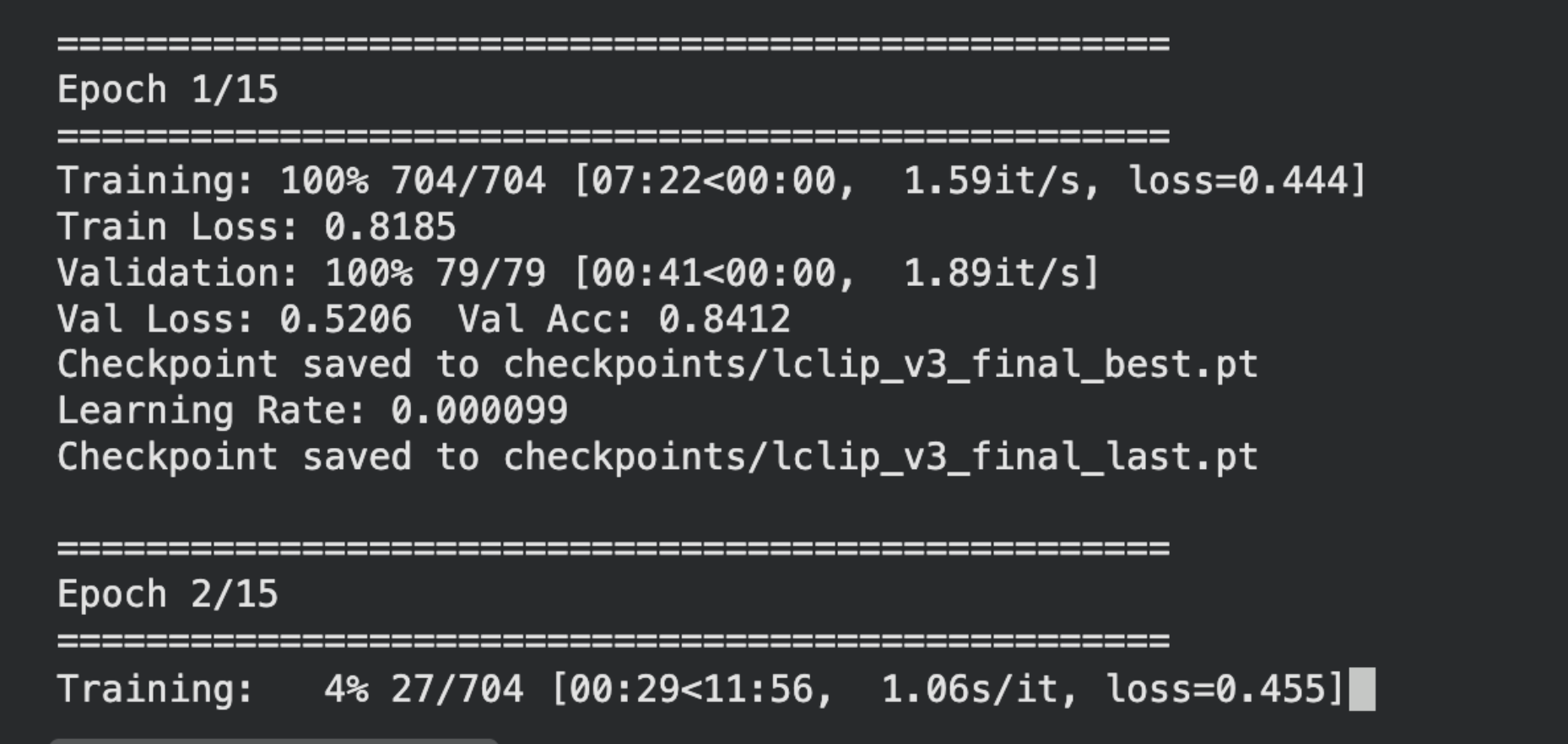
그리고 구글 colab 무료버전에서 "2017 Val images [5K/1GB]"와 "2017 Train/Val annotations"
데이터 셋을 최대한 학습 시켰다.
데이터 25000쌍을 22,513개(공부용)와 2,501개(시험용)로 나눠서 학습을 돌렸는데 Val Acc 가 생각보다 괜찮게 나와서 놀랐다.
v1, v2 에서는 0.3~5 정도로 형편없게 나왔었다.
그 후 export 하고 퀄컴 ai hub 에서 돌렸는데
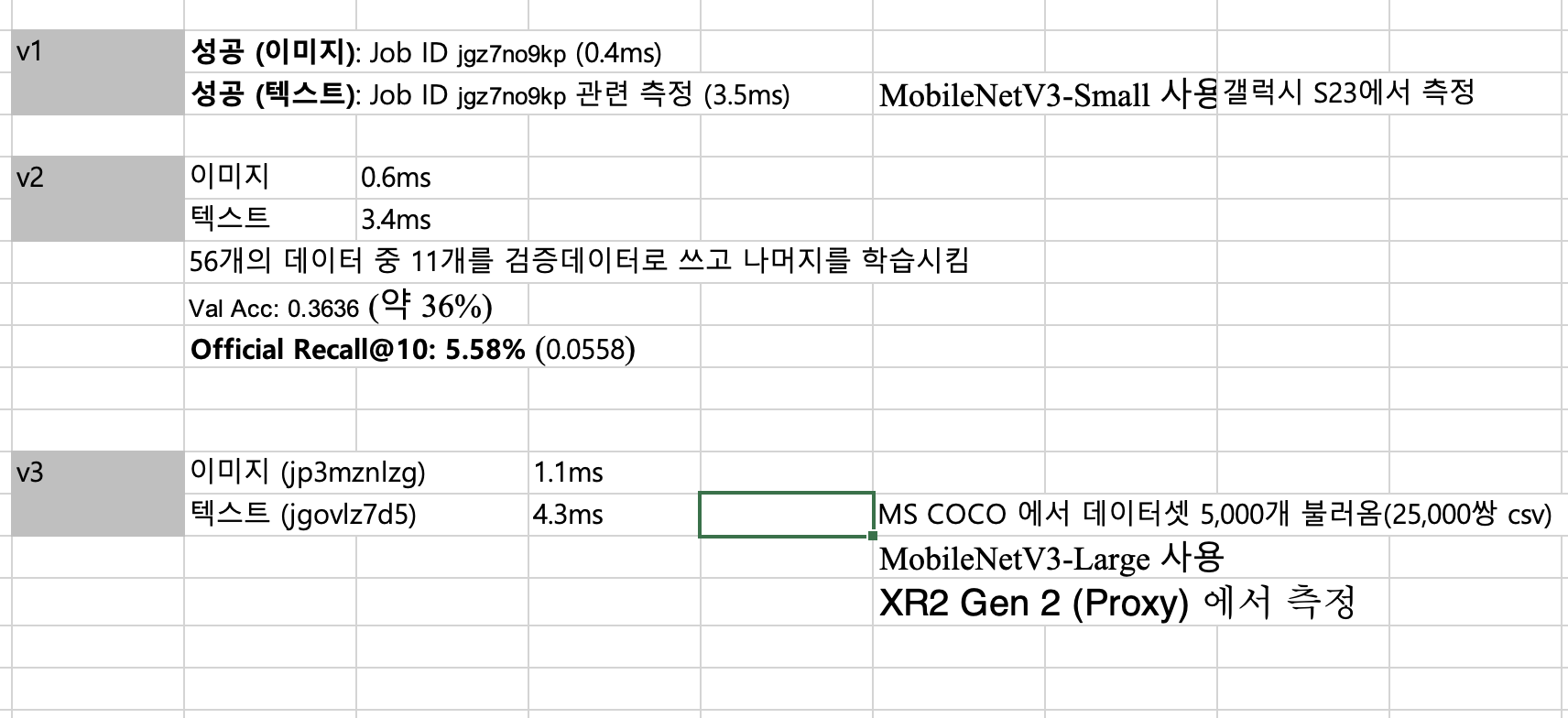
흠...근데 Val Acc 가 0.89까지 나온게 만족스럽긴 한데
정확도는 훈련 중 모의고사처럼 테스트 해본거라 정보가 신뢰가 안간다 !!
그렇다고 v2 처럼 컴파일해서 Recall따지는건 시간이 너무 오래걸리고
대회 측 채점기준 dataset 도 비공개라 정확한 채점이 안된다는??? 정보를 알게 되어서 (맞게 이해했는지 모르겠음)
ㅠㅠ 복잡해

근데 재밋다
모델 만드는거 자체는 재밌는듯!
'AI' 카테고리의 다른 글
| Zero-shot/Few-shot, Pydantic (0) | 2026.07.10 |
|---|---|
| LangChain과 ToolStrategy와 Proxy 쓸 때 Json parsing 오류 (0) | 2026.07.10 |
| 기계학습 강의자료 4 openface 실습 환경세팅 + 실습 과정 (0) | 2026.07.07 |
| LPCVC 준비 2 (0) | 2026.03.30 |
| 2025 SPG F.A.T.I 준비 (기초 환경설정) (7) | 2025.08.12 |


